
Every function your office runs — on one platform.
Eleven modules over a single tenant, auth, GIS, and data core. Turn on exactly what your jurisdiction needs and add the rest later without a migration. Every screen below is the real product, running on a live demo county.
From resident complaint to closed case.
Run your office's full lifecycle — complaint intake, inspections, notices, citations, and abatement — as one connected case with a numbered, timestamped history. Officers work a live queue instead of a spreadsheet, and every action is recorded, so the file holds up when it matters.
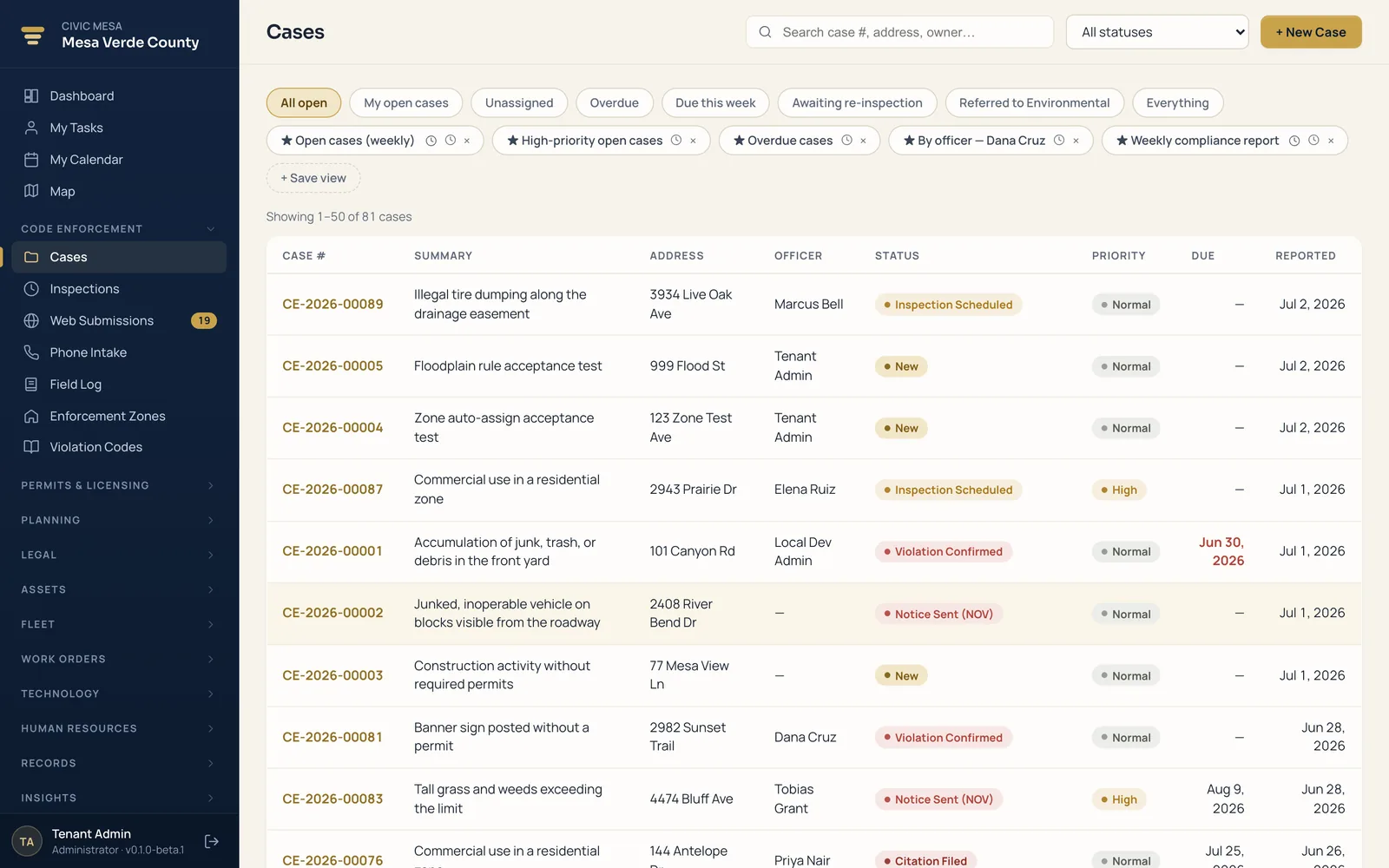
- One click to a case
Portal complaints and counter reports convert to a full case in one click, carrying the address and a tracking code the resident can follow.
- Geolocated inspections
Scheduled inspections with on-site photos, video, and documents pinned to the record — an append-only timeline you can stand behind.
- Notices from your templates
Generate notices and citations as PDFs from your jurisdiction's own template, pulling the case address and violations.
- Enforcement zones & timers
Set compliance deadlines by zone; the system tracks the clock, escalates automatically, and can accrue per-day fines.
- Complainant shielding
Keep the reporter's identity protected while the case moves through the office and, if needed, the courtroom.
- Citations, abatement, liens
Escalate confirmed violations into citations, abatement, and recorded liens without ever leaving the case.
Permits and licenses in one connected record.
Run your building and site permits alongside every business, contractor, food, alcohol, and animal license your office issues — with fees, renewals, and inspections on each record. Because permits and licenses share the same property and party data as your code office, staff stop re-keying and issue with the full history of a property in front of them.
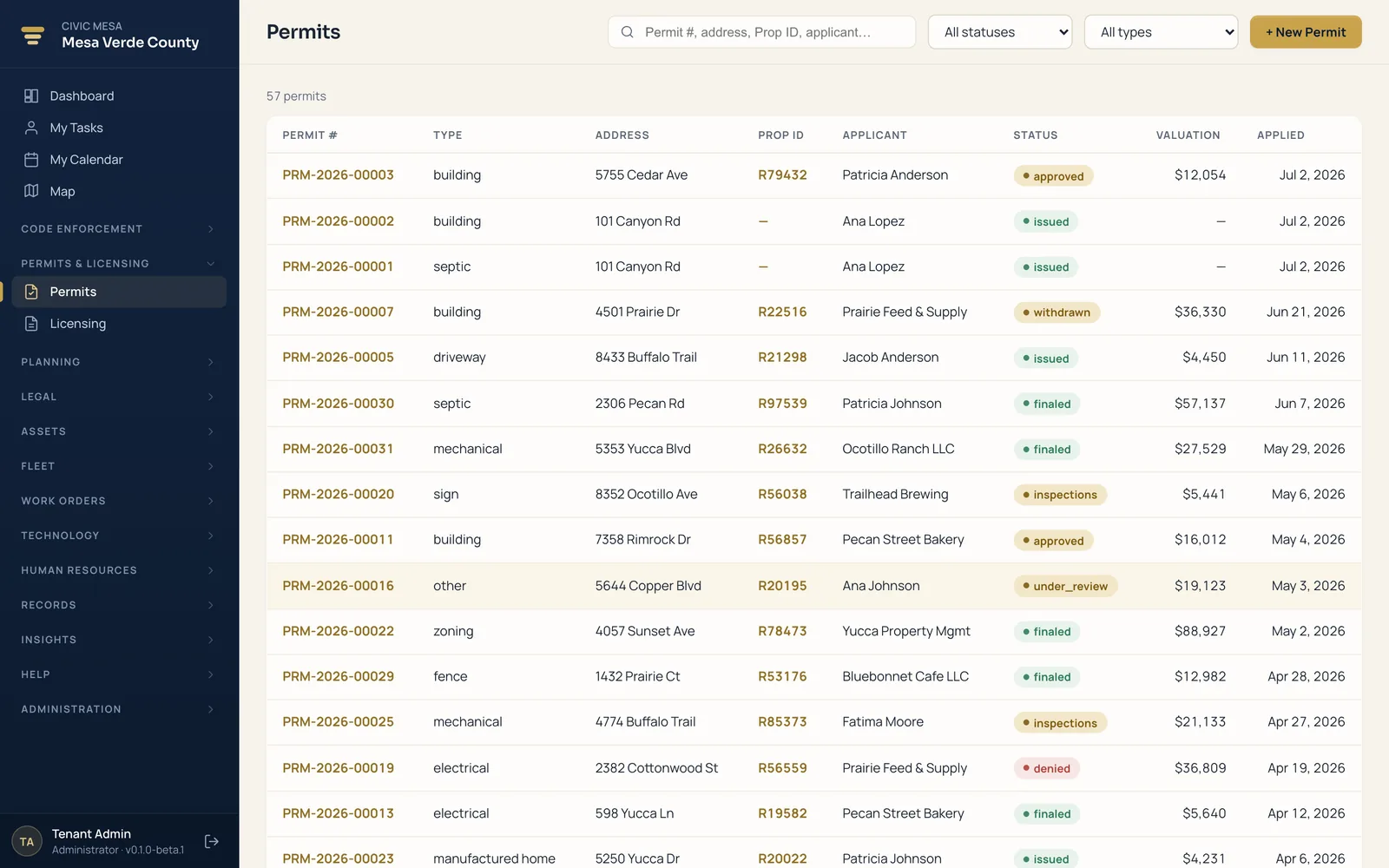
- Applications through issuance
Applied → approved → issued → finaled, with every status change stamped on the permit's own timeline.
- Licenses, guarded lifecycle
Business, contractor, food, alcohol, and animal licenses with validated transitions that block illegal status jumps.
- Renewals clone the record
Renew in one action; the system clones the prior license and links back to it, so the history stays intact.
- Expiring-soon report
Licenses bucket as expired, expiring soon, or current so clerks work renewals before they lapse.
- Open-case warning at issuance
Issue on a property with open code cases and the system warns you before the permit goes out.
- Shared fee engine
Set and mark-paid fees on permits and licenses, captured on the record for the front counter.
Never miss a statutory decision deadline again.
Run your subdivision, plat, and development review as tracked projects, each moving through a defined pipeline from intake to recording. A built-in statutory shot-clock counts down every decision deadline, so approvals never lapse by operation of law and the backlog stays visible and defensible.
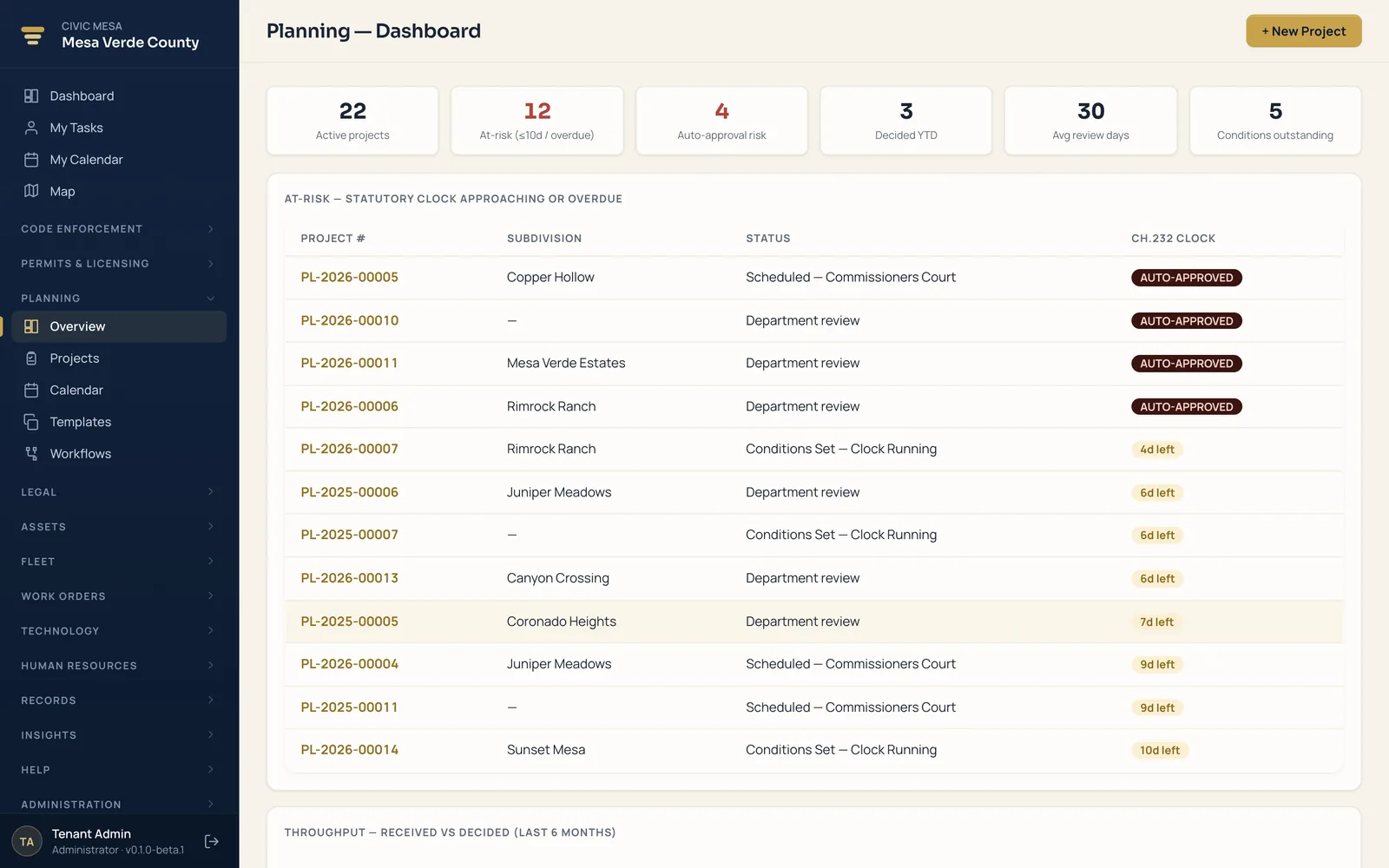
- Statutory shot-clock
Completeness, decision, and resubmittal clocks show days remaining and flag imminent auto-approval.
- At-risk dashboard
Active projects, at-risk and auto-approval risk, decisions YTD, and average review days at a glance.
- Guided review pipeline
Received → Conditions Set → Dept review → Governing Body → Decided → Recorded → Closed.
- Templates & custom workflows
Seed milestones and conditions from a template, or define your own stage pipelines with day targets.
- Conditions that lock
Each condition cites a code or statute, and the list locks permanently once the decision is recorded.
- Month calendar
Deadlines, hearings, milestones, and task due dates plotted across all active projects.
From the code office to the courtroom — one file.
Carry a code matter the whole way — citation, court case, hearings, abatement, and lien — without re-keying it into a separate system. Every step links back to the originating code case, so your staff, your prosecutor, and your finance office all work from the same file and the same timeline.
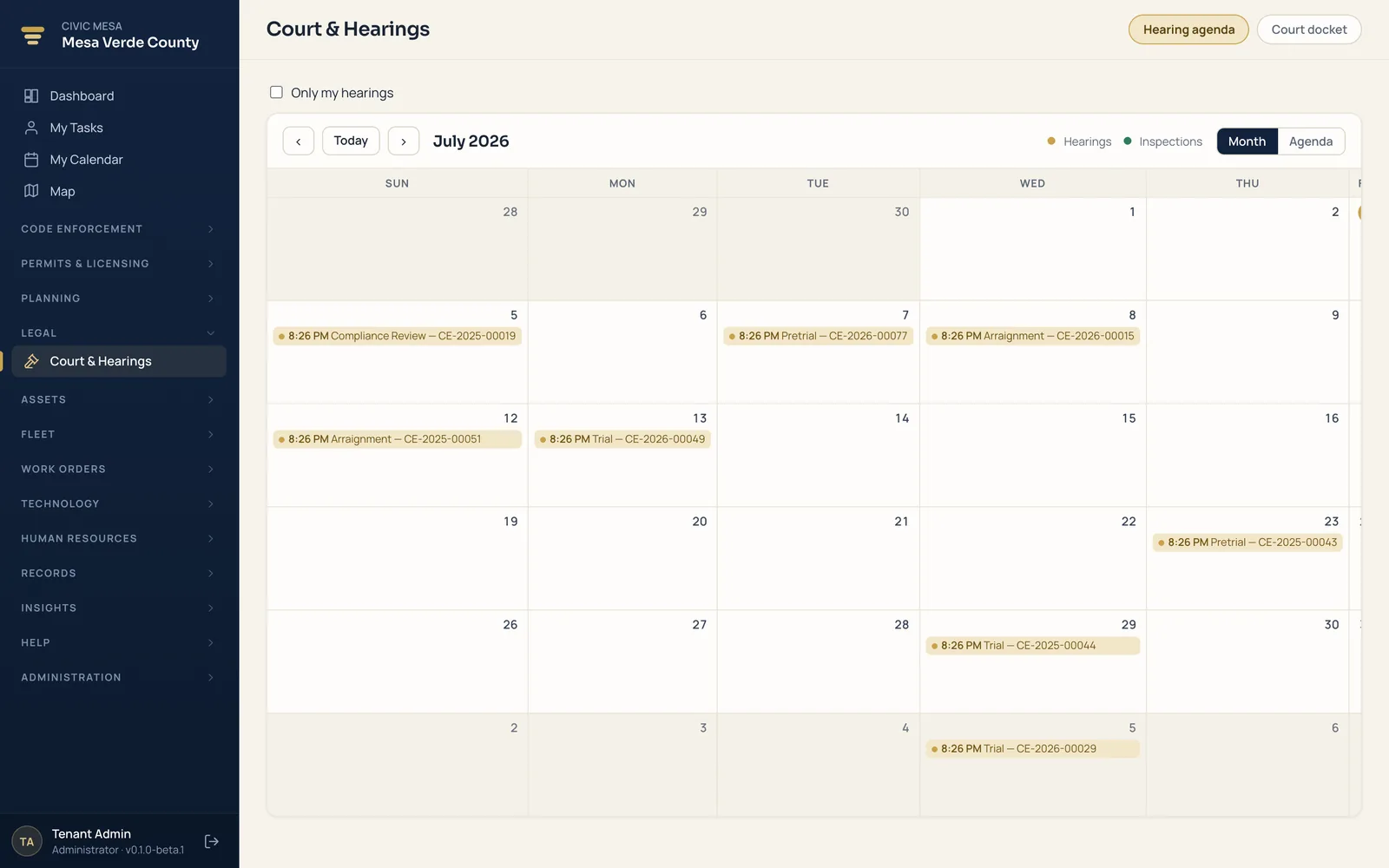
- File straight from the case
Turn an open code case into a citation with charge level, statute, and fine — the case advances automatically.
- Full citation lifecycle
Draft, issued, filed, served, pending court, warrant, disposed — with daily-fine accrual from the date you set.
- Real docket detail
Internal and court docket numbers, court type, judge, prosecutor, fines and costs, and amounts collected.
- Hearings calendar
Arraignments through show-cause hearings, assigned officers, chained continuances, filter to your own.
- Hearings to your inbox
A daily digest of the week's hearings, plus a personal calendar feed for Outlook or Google.
- Abatements & liens
Authorize cleanup and recover the cost; record and generate abatement, fine, and demolition liens.
One queue for every resident concern.
Give your office a single place to receive resident concerns, talk back to the people who filed them, and record what your crews actually did in the field. Nothing falls through the cracks: every submission lands in one queue with a tracking code, a two-way message thread, and a running field log tied to the address and the case.
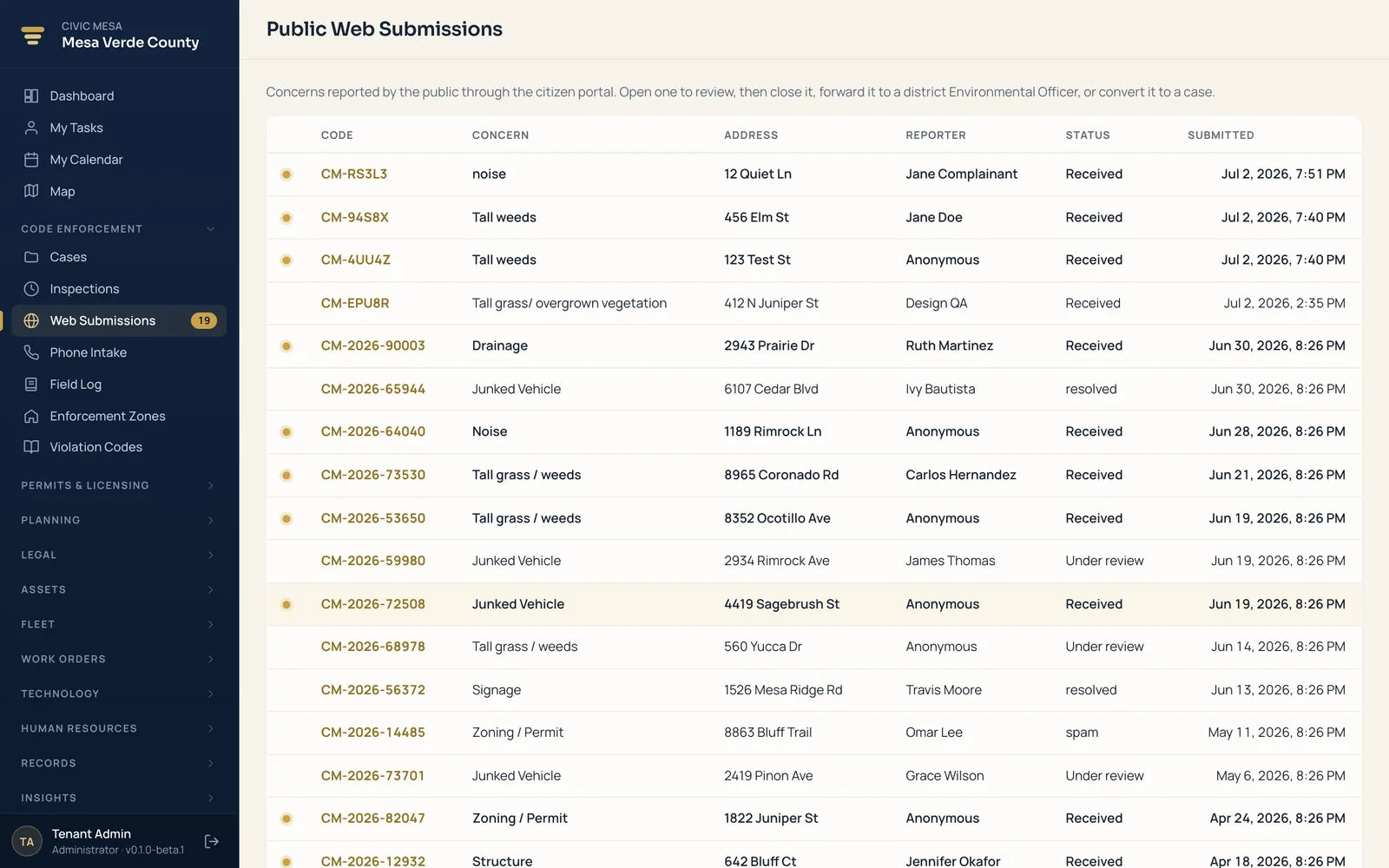
- One intake queue
Portal reports and phoned-in concerns land in one filterable, newest-first queue.
- Two-way messaging
Reply to the resident from the submission; the full thread stays attached to the record.
- Tracking-code lookup
Residents check status themselves on the portal — fewer "what happened?" calls to your desk.
- Daily field log
A shared log of what crews did and where, with threaded replies and pinning for the supervisor.
- Routing & hand-offs
Forward a concern to another district or service, with the routing recorded and staff notified.
- Privacy controls
Shield reporter identities and redact contact details for read-only roles, so you can share the queue widely.
Know what you own, who has it, and what it costs to replace.
One register for every piece of equipment your jurisdiction owns — from laptops and radios to tools and yard gear — tracking where each item lives, which staff member holds it, and when it reaches end of life. The result is a defensible inventory you can hand to an auditor and a replacement forecast you can drop straight into next year's budget.
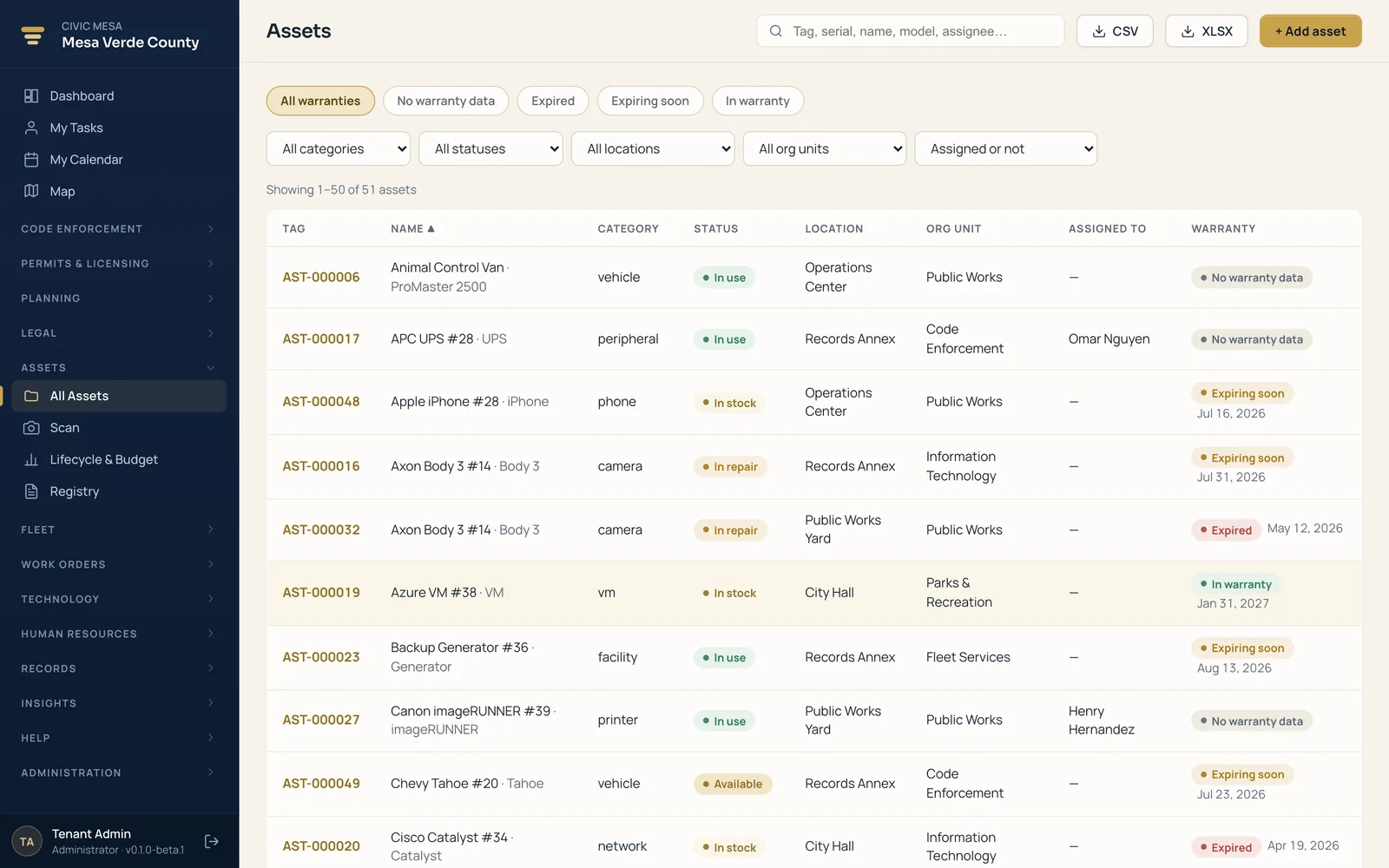
- One register for everything
Tag, serial, make/model, category, cost, and funding — by location, org unit, and assigned staff.
- QR & barcode labels
Print QR and barcode labels onto standard Avery sheets and scan a tag to pull it up.
- Scan-and-go custody
Check out and check in by scan; every checkout, audit, move, repair, and retirement is recorded.
- Warranty at a glance
Assets bucket into expired, expiring-soon, and active, with an attention list before coverage lapses.
- Replacement planning
Plan per-asset or net-new, roll costs up by fiscal year and org unit, and export to CSV or XLSX.
- Photos & receipts on record
Attach the equipment photo, purchase receipt, and warranty docs to each asset.
Every job from request to close-out, costed automatically.
One register for every job — from routine preventive maintenance to emergency repairs — with a status board, scheduling, and labor and parts tracking built in. Crews always know what's next, supervisors see what's overdue at a glance, and every order carries a costed, auditable history from the day it's requested to the day it's signed off.
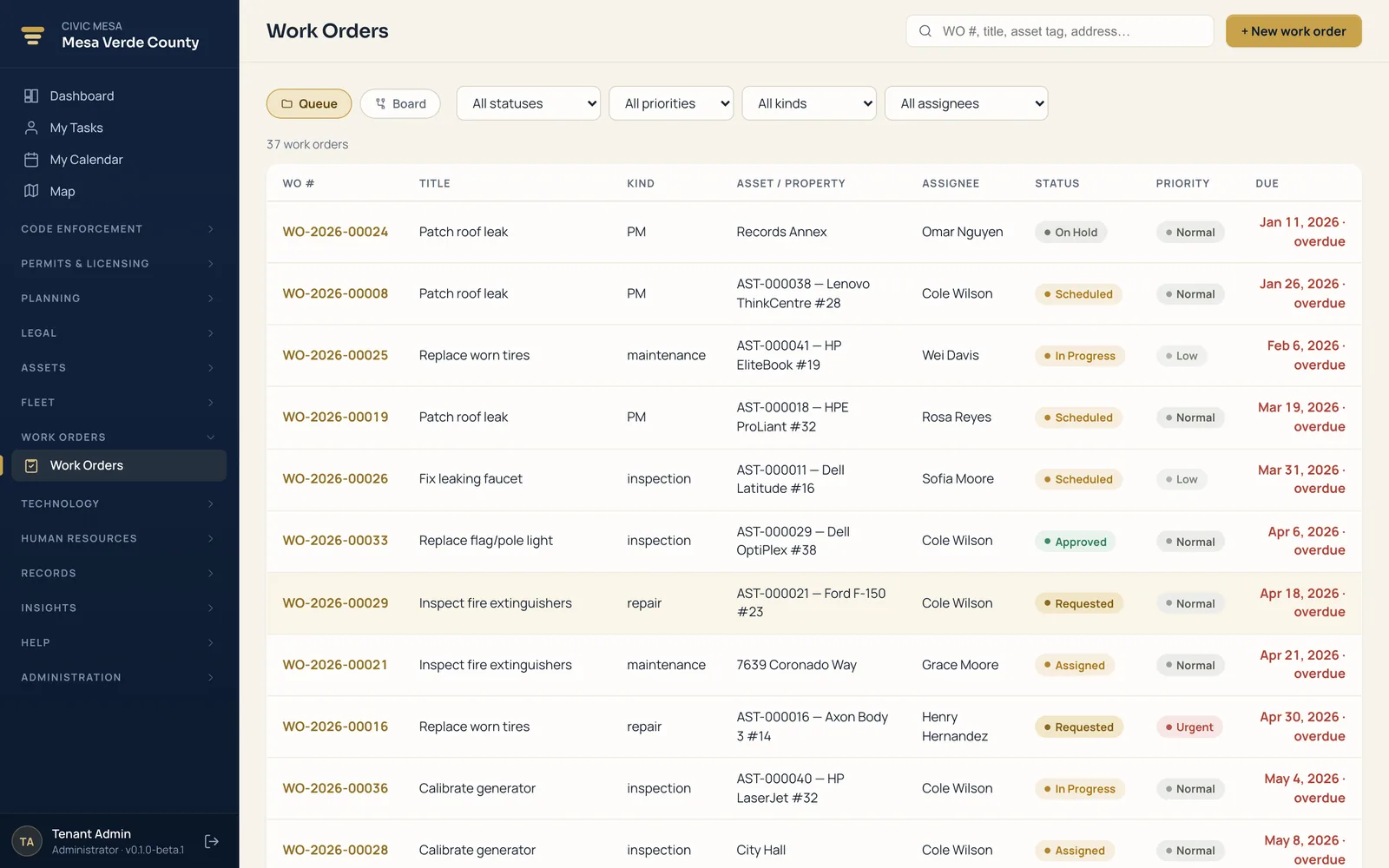
- Queue and status board
Switch between a filterable queue and a board with a column for each stage of the job.
- Priority and job type
Low to Urgent; Maintenance, Repair, Inspection, PM, or Project — filter to the right jobs first.
- Labor & parts, costed
Hours × rate and quantity × unit cost total automatically so you know what a job actually cost.
- Overdue in plain sight
Past-due open orders flag red on the queue and board and land on the shared calendar.
- Full audit trail
Guarded status transitions and an append-only timeline stamped with who did it and when.
- Linked to asset & property
Each order links to the asset serviced and the shared property, so a code case sees the related work.
Every vehicle, mile, and service interval — in one record.
A single, current record for every county vehicle — the details, the running logs, and the preventive-maintenance schedule that tells you what's due next. A built-in service catalog and recall/manual library mean your shop works from the same reference the manufacturer uses, and turning Fleet on turns on Assets automatically.
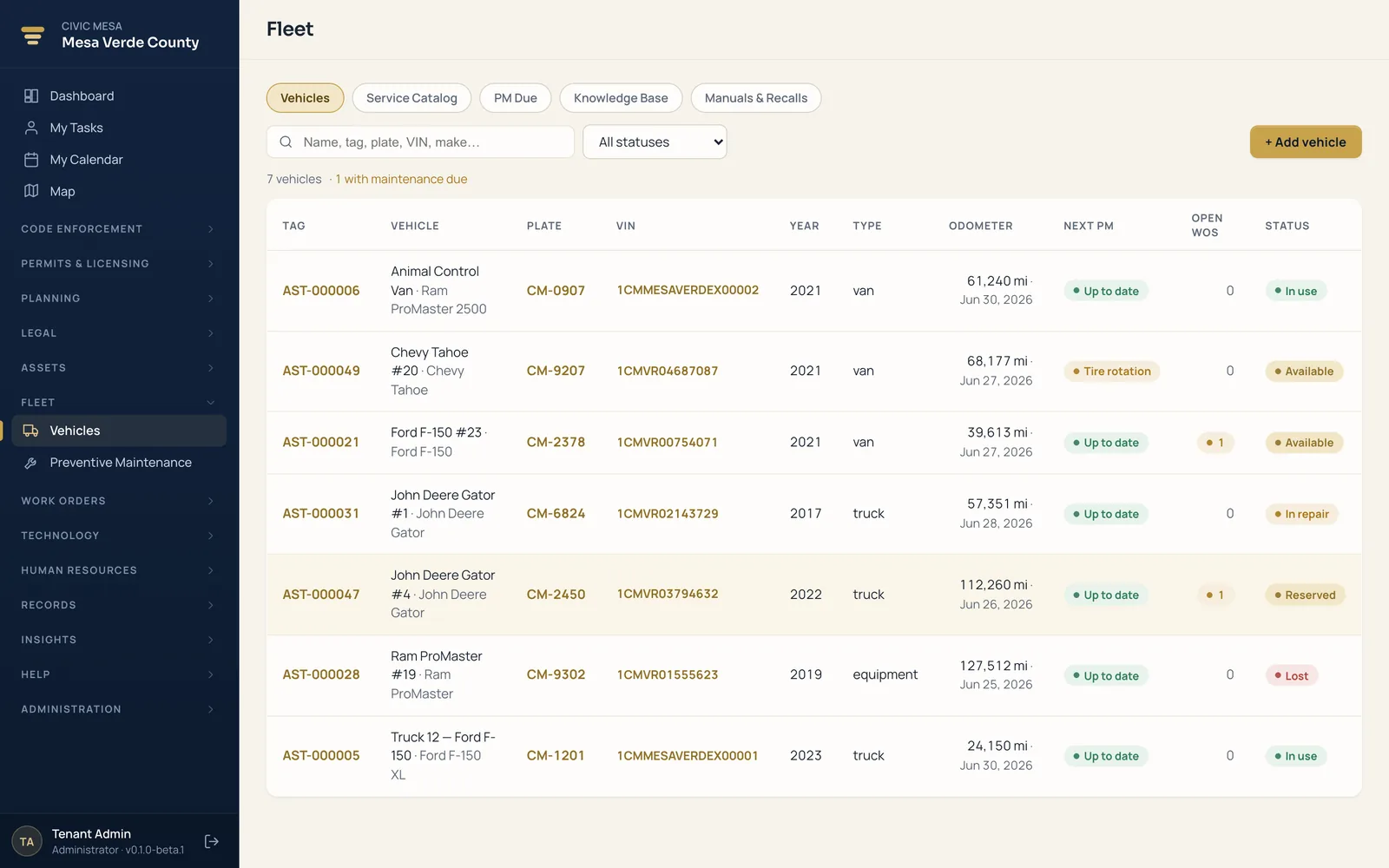
- One record per vehicle
VIN, plate, year, type, and fuel — and a duplicate VIN is rejected so a truck is never entered twice.
- Odometer, fuel, service logs
Every reading, fuel purchase, and service event with cost and vendor — a full running history.
- PM by miles or months
Set an interval in miles, months, or both; Fleet decides what's due from the live odometer.
- Service catalog & recalls
A built-in catalog of vehicle and equipment services, plus a manuals and recalls library and a fix-action knowledge base.
- Work orders that write themselves
A due schedule generates a PM work order — never a duplicate if one is already open.
- Logging service closes the loop
Record a completed service and the interval rolls forward automatically — no manual reset.
Run the whole IT department on one platform.
Far more than a help desk: incidents, service requests, change management, an IT asset inventory, and self-service access requests — each tracked against a service-level target and tied to the equipment and people it's about. Because it runs on the same core as everything else, a ticket already knows your staff, your departments, and your hardware.
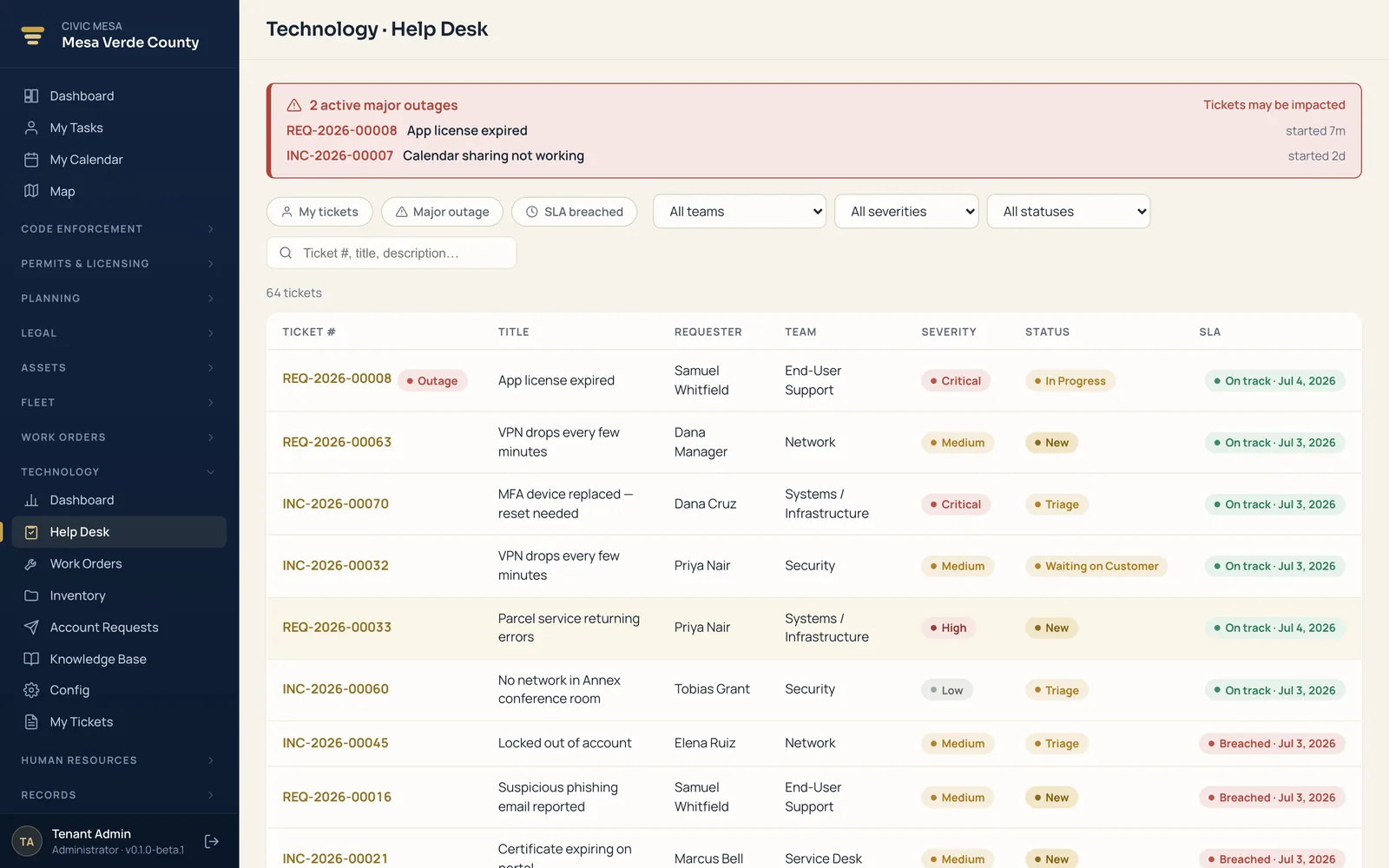
- Service desk with SLAs
Incidents, requests, and questions in queues, each on a service-level target — the desk shows backlog, breaches, and aging, and lets you declare a major outage.
- Change management
IT work orders route through configurable approval chains, so a risky change is reviewed and signed off before it lands.
- IT inventory & CMDB
Every device, license seat, and warranty with a lifecycle state — assigned, in stock, in repair — and a link to the tickets it's tied to.
- Access requests
Staff request accounts and permission sets through a self-service catalog that routes each one down the right approval workflow.
- Knowledge base
Write and publish fixes and how-tos so the common questions answer themselves — and technicians resolve the rest faster.
- Self-service, one login
Staff file and follow their own tickets; requesters and technicians are your existing people — no separate help-desk product to buy.
Keep residents and staff in the loop automatically.
Send email and SMS updates when key events happen across your office — a case status change, a permit or license decision, an inspection result, an acknowledged public submission. Your staff edit the wording themselves, so residents hear from you promptly and consistently without anyone drafting a one-off message.
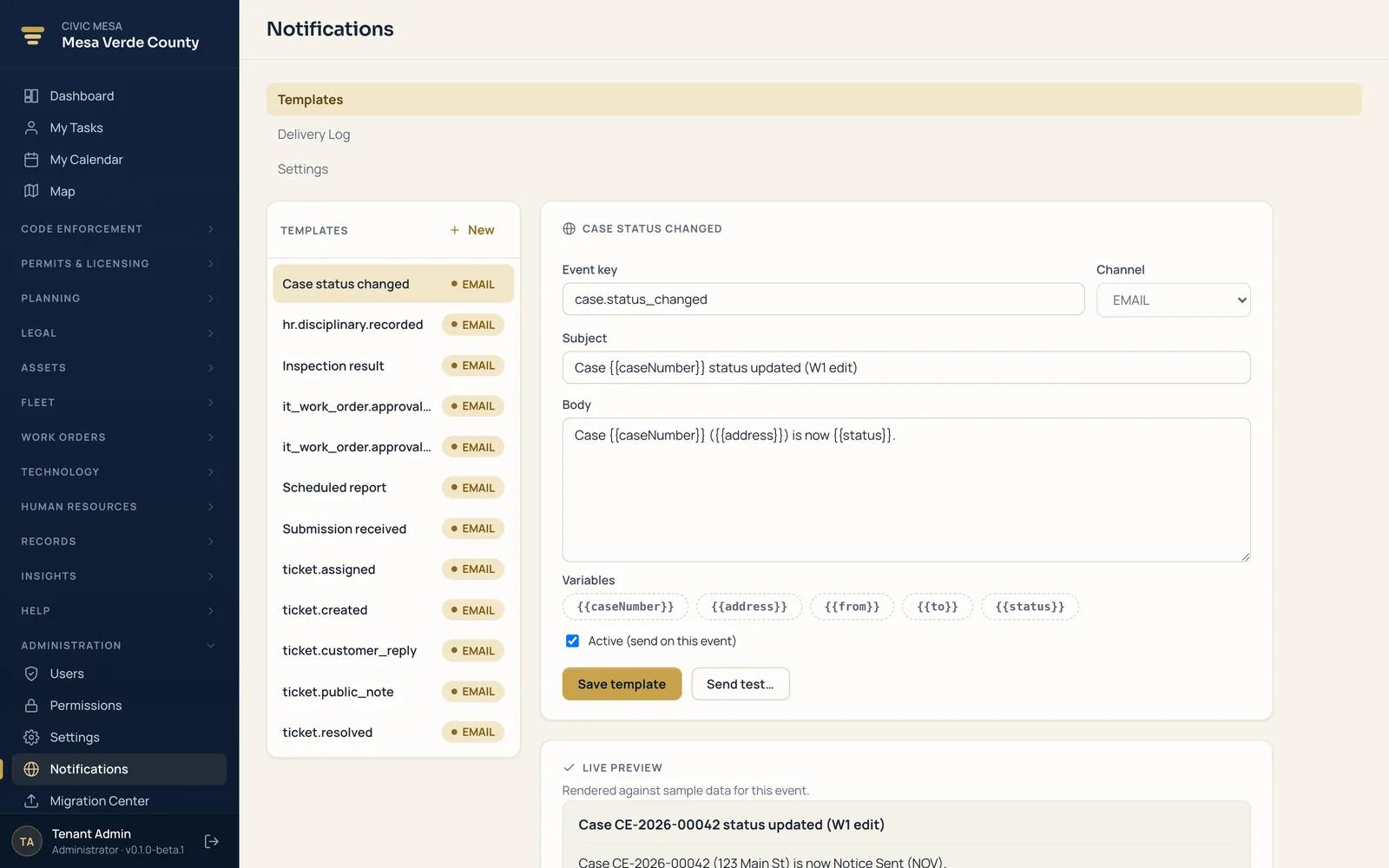
- Automatic on real events
Messages fire on events already happening in your modules — status changes, decisions, results.
- Templates in your words
Edit each event's template in-app with click-to-insert variables like case number and address.
- Starter templates day one
Turning the module on seeds ready-to-use templates your team edits or extends.
- Preview & test send
See how a message renders against sample data, then send a real test to yourself.
- Delivery log
Every message recorded with event, channel, recipient, and status — filterable for proof.
- Channel & quiet hours
Master email/SMS switches and an optional quiet-hours window that holds off-hours sends.
Hire, evaluate, and manage your people in the same system.
A full HR suite for the county — applicant tracking from job posting to hire, a branded careers page residents apply on, an employee directory with departments and reporting lines, and performance reviews that finalize into an electronic personnel file. The people your other modules already reference, managed where they live.
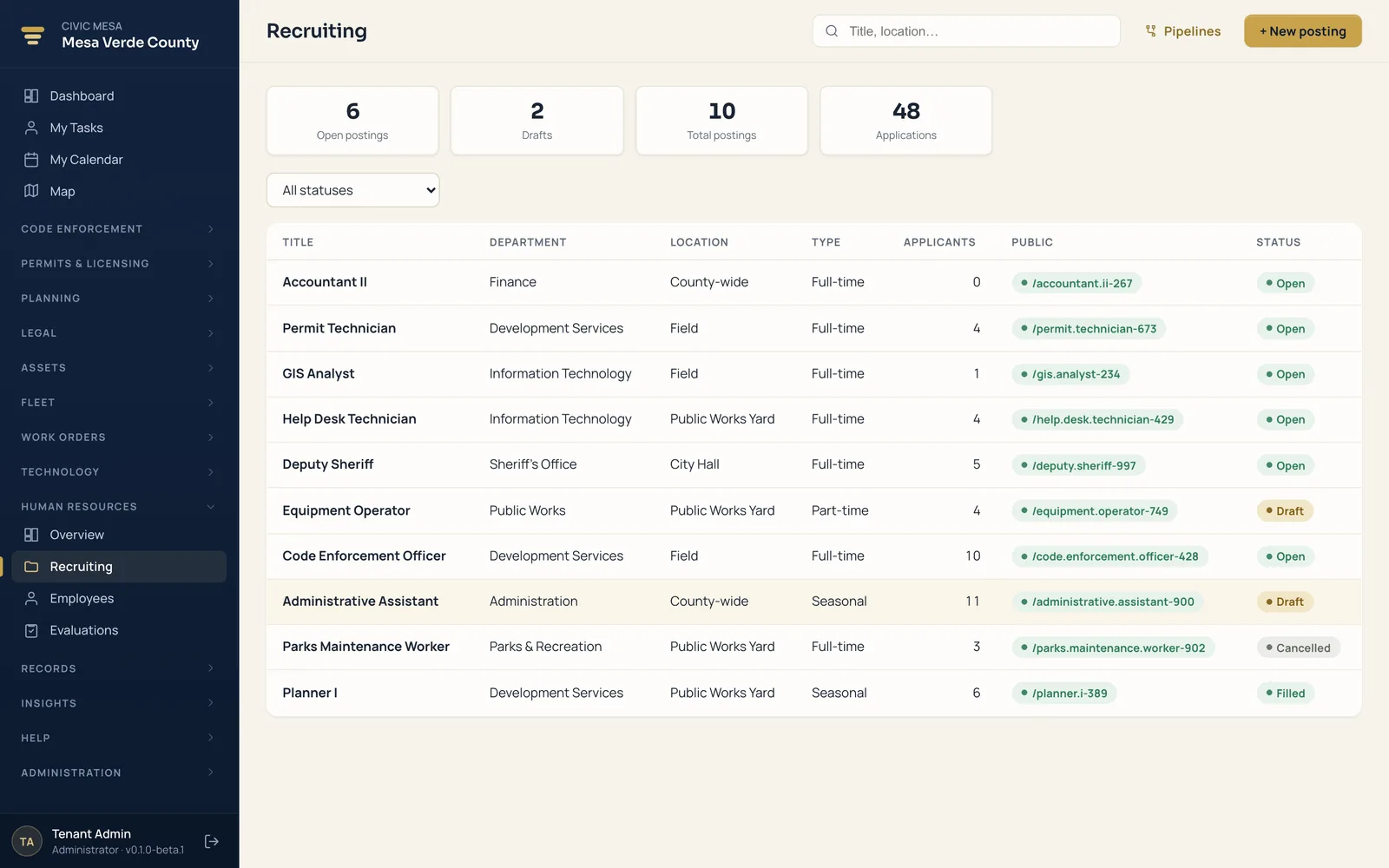
- Applicant tracking
Post a job, collect applications, screen candidates, schedule interviews, extend offers, and hire — all on one pipeline you configure.
- Public careers page
Open positions publish straight to your resident portal, where anyone can browse pay ranges and apply online with no account.
- Employee directory
Every employee, department, and reporting line in one place — with employment type, status, and a manager hierarchy.
- Performance evaluations
A six-stage review workflow with a public-sector competency library and a 1–5 rating scale your county relabels to match policy.
- Electronic personnel file
Finalized appraisals and documents publish into each employee's ePF and generate a PDF of record for the file.
- Departments & discipline
Organize staff by department, track disciplinary records, and watch headcount and hiring on the HR dashboard.
One set of numbers everyone trusts.
Dashboards that read across every module you've turned on — from one data core, not five disconnected reports. Backlog, cycle time, fee revenue, and inspections due sit side by side, current as of your last action, and every figure exports to the row it came from.
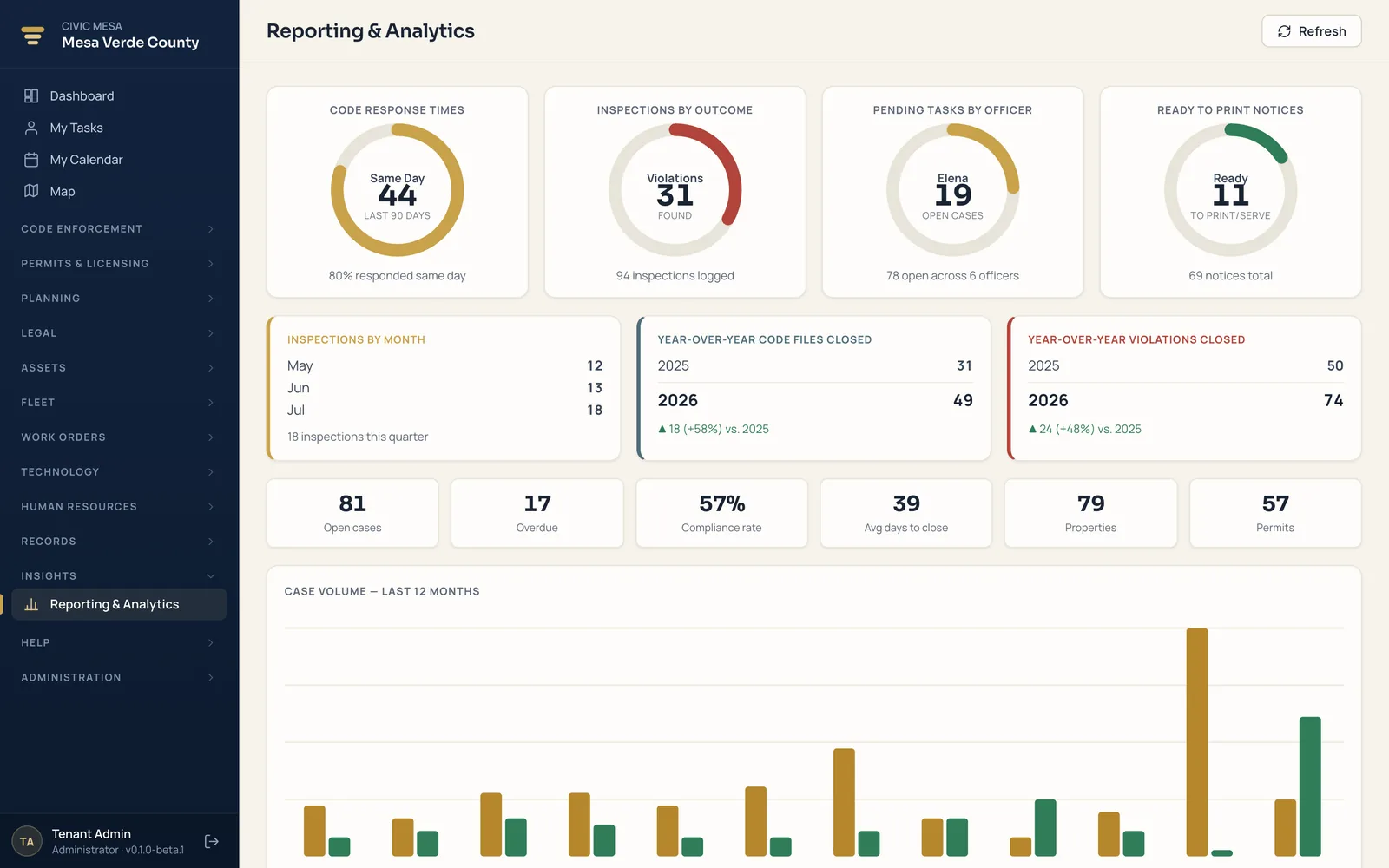
- Cross-module KPIs
Backlog, cycle time, compliance rate, fee revenue, and inspections due — read across every module you've enabled, on shared data.
- At-a-glance gauges
Response time, inspections by outcome, workload by officer, and notices ready to print and serve — the day's picture in a screen.
- Year-over-year trends
Cases and violations closed this year against last, with the deltas and percentages computed for you.
- Twelve-month volumes
Opened versus closed by month, so you can see where work is piling up before the board asks.
- CSV exports
Pull the rows behind any number for a board packet, a finance reconciliation, or a records request.
- One source of truth
The figure on screen, in the export, and in the meeting all match — because they come from the same record.
Turn on the modules your county needs.
Book a demo, then run a pilot on your own jurisdiction — import from your current vendor, enable modules one at a time, and evaluate on your own records and branding. Every module is a flat annual rate with unlimited users, so the whole office logs in without growing the bill — and your data stays portable, so there's no lock-in.